How to use Pinterest Downloader?
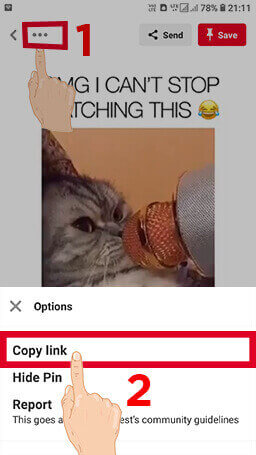
#1. Copy Video URL
Copy the Pinterest video URL which you want to save.

#2. Paste The Links
Paste the URL of the Pinterest video that you copied to download, then click the download button.

#3. Download Video
Now just click the download button and your download will be started.
Pinterest Downloader
Pinterest Downloader is a fast and reliable Pinterest video downloader online that helps you save
Pinterest videos, images, and GIFs directly to your device. It works smoothly on mobile phones,
tablets, and desktop browsers without requiring any installation or sign-up.
With this tool, you can download Pinterest video files in MP4 format and save images in high-quality
JPG format. The process is simple, clean, and designed for users who want quick access without
technical steps.
Many users look for a way to download Pinterest videos because the platform does not always provide
a direct download option for every post. This tool solves that problem by offering a straightforward
and user-friendly solution that works in seconds.
How to Download Pinterest Videos, Images, or GIFs
Using this Pinterest video downloader is simple and beginner-friendly. No signup or payment is required. Just follow the steps below.
-
Open Pinterest and choose the video, image, or GIF you want to download.
-
Tap the share option or menu icon and copy the Pinterest URL of the selected content.
-
Paste the copied link into the downloader input box on this page.
-
Wait a moment while the tool processes your request and prepares the file.
-
Click the download button and save the Pinterest video, image, or GIF to your device.
Video Guide

Frequently Asked Questions
-
Do I need an account to download Pinterest videos?
🔓 No account is required. You can download Pinterest videos, images, and GIFs instantly without signing up or logging in.
-
Is YourDomain safe to use?
🛡️ Yes, the tool is designed with user safety in mind. It does not require installation, and it does not include harmful files, malware, or hidden scripts.
-
Where are downloaded files saved?
📂 Downloaded files are saved in your browser’s default download folder. If you cannot find them, you can open your browser’s download history.
-
💻 On Windows, press Ctrl + J to view recent downloads in your browser.
-
🍏 On Mac, press Cmd + Shift + J to open the download list.
-
📱 On mobile devices, check your browser’s download section or file manager.
-
-
Do you store downloaded videos or user data?
🔒 No, we do not store your downloads or track your activity. All content remains on Pinterest servers, and downloads are processed without saving user data.
-
How can I download Pinterest videos on Android?
📱 Open your browser, visit YourDomain.com, paste the Pinterest link into the downloader box, and tap download. The file will be ready within seconds.
-
How to download Pinterest videos on Mac?
💻 You can use the Pinterest downloader directly in your browser. No software or extension is needed to save videos in MP4 format.
-
Copy the link of the Pinterest video you want to download.
-
Paste the link into the downloader input field.
-
Click the download button to start the process.
-
Once ready, click download to save the video to your Mac.
-
-
Is this Pinterest video downloader free to use?
💸 Yes, this tool is completely free. You can download Pinterest videos, images, and GIFs without any charges.
-
Is there any download limit?
♾️ There is no fixed limit. You can download as many Pinterest videos or images as you need.